What is a Video Wall Processor?

Many companies and non-profit organizations that are considering implementing a video wall processor may still be unsure on whether it is required or whether it is worth the investment. This is a debate that some companies are still facing as multi-screen displays, known as video walls, are gaining popularity in a wider range of use cases from retail stores to hospitality, sports stadiums, classrooms, control rooms, lobby signage and corporate boardrooms.https://folaida.com/product-item/video-wall-processor/

While video wall technology may be complex, the reasoning for their widespread use is straightforward: video walls bring an easy solution to a big challenge: how to showcase information to both large and small audiences in a dynamic and adaptable manner. Video walls allow displaying a combination of content coming from multiple sources; they also provide an immersive experience which makes this information more impactful.

In addition to the screens themselves, video walls require advanced technology to make them dynamic and flexible to control what content is presented where, how, and when. This is where video wall processors come into play.

What is a Video Wall Processor or Video Wall Controller?

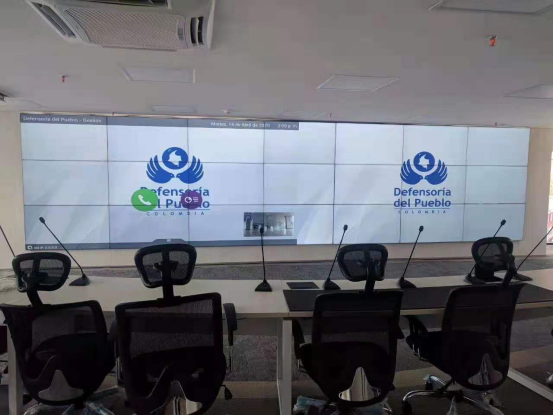
Briefly defined, a video wall processor (sometimes referred to as a video wall controller) is a piece of software (often installed on a hardware unit) that allows the management of content on multiple monitors in a multi-monitor display or video wall, as a single canvas. A video wall processor gives users the flexibility to visualize any piece of content across multiple screens or the entire video wall. It also allows for multiple pieces of content to be viewed on a single screen, a portion of the video wall or the entire wall, in any one of the unlimited possible combinations. Each display can be controlled individually or in groups, leading to a dynamic display solution that could be utilized to meet a wide range of display requirements while also delivering information effectively and compellingly. The number of monitors in a multi-monitor system might span from two to two hundred or more. The dimension and design of the video wall is determined by the requirements of the target audience.

What is the Purpose of a Video Wall Processor/Video Wall Controller?

Visualization solutions require some type of technology to control what a viewer can see. Consider an air traffic management centre: the more developed and intricate a framework is, the more robust the control system must be. To get the maximum benefit from a multi-monitor setup, maximizing performance, picture quality, security, and automation, a video wall controller is needed.

However, not all video wall controllers are created equally. The best ones offer increased usability, giving an organization’s audio-visual team or video wall operators, the tools they need to get the most out of the technology, right at their fingertips.

1. There Are No Resolution Restrictions

Resolution is a popular concept. It all comes down to the number of pixels available, we call this “display real estate”: the more pixels on a screen, the higher the pixel density, the more accurate and better the quality of image you will get. It’s easy to see why video wall controllers are very efficient at producing an impressive visual impact based on this flawed concept. When you build a video wall with a series of high-definition screens, the resolution increases incrementally. A video wall can only effectively display high-resolution content without quality degradation if it benefits the support of a powerful digital signal processing unit, i.e. a video wall processor.

2. Signal Processing – Many Sources With Various Formats

The connection and capacity to capture various sources on a single screen or projector is limited. They can interface with a limited number of devices and each screen can only display one specific source at a time. A video wall processor is needed to overcome these limitations so that a video wall can simultaneously display several streams from various sources and source types in any size, configuration or aspect ratio that is desired, across the single logical surface formed by the multiple monitors joined together.

3. Processing Capacity and Performance

Professional high-end controllers bring many other additional benefits like the ability to enable internet access, allowing to display live web sources on the video wall or other apps, like clocks, dashboards, or emergency messaging, all at the same time. In addition to that, they can mix both baseband and IP sources and display them anywhere on the wall. Some even come with control panel designers that would allow you to design buttons on any computer or tablet that would permit users to change layouts on the video wall with a simple click of a button. The right video wall controller can deliver a high level of flexibility and achieve incredible processing performance, resulting in an infinite number of custom configurations for impactful and effective visualization experiences.


https://studio.youtube.com/video/2aDKrQsPr20/edit

Related Links


  • Video Wall Processor– Explore advanced video wall processor options designed for seamless HD display control and management.
  • LCD Video Wall Solution– Discover comprehensive LCD video wall solutions that complement high-resolution processor technology.
  • HDBaseT Matrix Switcher– Learn about HDBaseT matrix switchers that enhance signal distribution for large venue displays.
  • Certificates– Verify compliance and safety standards with certified video wall processor products.
  • FAQ– Find answers to common questions about video wall processors and related digital signage technology.

What is multi-channel encoding?

Multi-channel encoding refers to the ability to serve multiple simultaneous streams from captured video sources. This is most useful for making a media source available to many destinations for immediate consumption (live streaming) and later consumption (on-demand streaming). Multi-channel encoding deals with problems such as: number of simultaneous viewers, types of viewing options (hardware vs. software, wireless devices, etc.), and recording options for on-demand streaming at a later time.
While video production environment workflows often deal in uncompressed video to maintain quality throughout the editing process, most applications of multi-channel encoding deal with compressed video for facilities AV and for content distribution across multiple locations and through the public internet.

Different ways to achieve multi-channel encoding

There are multiple different workflows for creating multiple streams.

Using a multi-channel encoder

One way to generate multiple different streams is by using encoders that have the processing power and features to produce multiple streams directly from the encoder.

The benefit of using a multi-channel encoder is that less hardware is required further down the pipeline. Configuration of the desired channels can be performed and tested locally. This type of encoder will often be more sophisticated, with more features and flexibility than cheaper encoders, and is often capable of higher quality video as well.

Using a streaming media server

Another way is to use streaming media servers, which usually means software running on dedicated appliances, PCs, or servers, that basically takes source streams as inputs and uses the processing power of the streaming media server to transcode and multiply the number of available streams. Some streaming media servers run on-premises. Some streaming media servers run in the cloud.

There are many types of media servers. Some are for serving media content at home. Some are for performing transcoding operations for enterprise video distribution. Media servers are very useful to enhance the functionality of any type of encoder. However, they either require additional hardware (for on-premises media servers) or subscription to a service provider (for cloud-based servers), and sometimes both.
While streaming media servers offer flexibility (especially for cloud-based services), they cannot improve the quality of the video that they receive. As such, if option A is to use a high-quality, multi-channel encoder streaming direct, and option B is to use a low-quality single-channel encoder in conjunction with a streaming media service the cost might come out to a similar level, or even slightly cheaper for option B, but the distributed video in option A is going to be far superior.
But streaming media servers and multi-channel encoders are not mutually exclusive. For example, you might use a multi-channel encoder to provide multiple resolutions on a local network at an event, and use an additional channel from that multi-channel encoder to send a stream off-site to a streaming media server. Alternatively the multi-channel encoder can send one stream to a network attached storage (NAS) device and a second stream to a streaming media server. In both cases the multi-channel encoder is capable of meeting the local requirements and sending a high-quality video to the streaming media server for mass distribution.

Benefits of multi-channel encoding

Using multi-channel encoders and/or streaming media servers provides multiple advantages.

1. Change/augment protocols

Since different video streaming protocols deal with different problems, it makes sense that multiple different protocols are sometimes required to get video from media sources, like cameras, all the way to many simultaneous consumption nodes like smartphones, tablets, PCs, media players, and game consoles, and over very large distances to a disparate base of viewers. This often necessitates the use of cloud services or the public internet.
For example: “continuous” streaming protocols, like RTMP, can help maintain certain aspects of video performance while minimizing latency.
HTTP-based protocols, like HLS and MPEG-DASH, package video streams into fragments to better borrow the massive interoperability of networks and software applications by behaving like all other network traffic. They rely on TCP transmission to provide error correction, and on HTTP to traverse firewalls without requiring special instructions. However, these protocols require huge amounts of buffering to make this all work which injects significant latency. These solutions are perfectly acceptable for on-demand streaming workflows. But the market is working very hard to continue to compress latency for live streaming applications.
So having multiple protocols and the ability to change protocols for different segments of your workflow allows you to maximize both reach and performance by providing you with the ability to have some more advanced nodes capable of maintaining a low latency and very high video performance while also assuring that everything else is compatible with your streaming delivery setup.
This applies at a local level just the same as it does over the internet.
Local
At a local level, an encoder running on a decent network can feed directly into a decoder and provide high-resolution video with minimal latency. If it is a multi-channel encoder, the same encoder can provide additional streams that work with standard players and browsers on lower bandwidth parts of the network, including wireless devices. Whether or not your encoder supports multi-channel encoding, it is also possible to use a streaming media server on your network to multiply the streams and/or change the protocols to suit your applications.
Some manufacturers of encoders also provide hardware and/or software decoders–minimizing complexity to have everything work together seamlessly.
“Recording” for on-demand streaming can also be fairly mission-critical in order to avoid losing a keynote speech or important moment during a network interruption. Sometimes multi-channel encoders and/or encoder and streaming media server combinations provide a local cache of what’s being recorded while simultaneously recording on cloud services. Or recording and simultaneously live streaming captured video sources may be the desired application. Here too, different protocols may be called into service such as FTP for an MPEG-4 file recording and a live RTMP H.264 stream.
Cloud/Internet
The same applies to cloud/internet where-by multi-channel encoding enables the use of the right protocols for the right segments of the video streaming workflow.
By leveraging the appropriate protocols it is possible to have a mix of very high-performance nodes and very easy-to-access nodes. Protocol flexibility also allows you to mix old/legacy compute equipment with much more modern equipment. This means it is possible to pursue continuous improvement and evolution of your video streaming infrastructure instead of requiring large overhauls and revolution of your infrastructure.
Many cloud streaming architectures currently use a low-latency protocol, such as RTMP from the video source to the cloud and use more broadly compatible HTTP-based protocols for mass distribution.
The multi-channel load can be placed on the encoder or the streaming media servers being used or a combination of the two.
Recorded files
Another instance of a change in protocol is when streaming from a stored file rather than a live source. A perfect example of this is Video on Demand (VOD) services. These providers must store the video content in a container, and when a user initiates a viewing session it then converts it from a stored file to a video stream which is sent to the viewer over the internet. This could be handled by a multi-channel encoder or streaming media server. The protocol that they will use to communicate with the viewing device (such as a SmartTV) will help inform them of the bandwidth availability and reliability of the network, which allows them to select the appropriate resolution stream to create/send from the stored file.

2. Change/augment number of resolutions

One of the most important variables that affects the bitrate of live streams is the resolution of the video being streamed. Multi-channel encoding deals with this problem as well.
Delivering streaming video is a balancing act between visual acuity and stability of the stream. In the early days of watching videos from the internet, users often experienced the frustration of buffering. Many videos were simply un-watchable.
Significant progress has been made to deliver optimal experiences that account for how much bandwidth is available and how much information can be carried in the video streaming payload to each node. (Higher resolutions require more information.)
Today, adaptive bitrate streaming technology automatically detects users’ bandwidth and computer processing availability in real time and provides a media stream that fits within these constraints.
Transcoding in the cloud is something that creates latency and requires paid-for services. For this reason, many organizations that generate a lot of private (corporate) video content are balancing the load by either sending multiple different resolutions from multi-channel encoders from each captured video source in their organization, or using adaptive bitrate encoders that can be leveraged by certain compatible multimedia players that have the ability to switch between the different bitrate segments and offer the maximum quality (often includes resolution) that optimally suits the compute power and network conditions of that player node.
In enterprise and media and entertainment encoding, this basically means that video sources are often sent at their maximum quality and resolution profile but the local encoder and/or streaming server also create additional stream copies of the source in reduced settings.
This “scaling” of video sources through multiplication of the streaming video profiles is very useful to instantly accommodate all destination types. A 4K source, for example, can be kept in 4K and decoded at an appropriately powered viewing node. But the same 4K source can comfortably supply the same source content onto tablets and smartphones. These devices often have a lower resolution screen anyway and the corresponding reduced resolution stream is served to match what the wireless network and processing power of these wireless devices can handle.

3. Change/augment streaming profiles or video container formats

One of the most important variables that affects the bitrate of live streams is the resolution of the video being streamed.
Another aspect of multi-channel encoding is the ability to convert assets from one streaming codec or video file format to another or to multiple others. This can be more processing intensive than changing protocols as in the example above. Going from one codec to another often requires decoding the original stream or file and transcoding it (re-encoding it) to one or more different codecs or file formats.
There are different motivations for changing the codec of your video assets.
Here is a simple example:
Assume an organization has added new equipment capable of generating very high resolution, such as 4K. When these new assets are captured at full resolution, using codecs that produce a small-enough bandwidth might be enticing. But the codec and/or encoding profile used directly from the source to mitigate its bandwidth use may not match what is the optimal codec or encoding profile for content distribution at large.
Using HEVC (H.265) to encode 4K content may appear to shave off some bandwidth and help assure the stability of the stream from its capture point to its stream re-distribution point on a network or on the internet. But HEVC tends to drain battery on handhelds more than H.264 and many older devices do not have hardware implementations of HEVC. Media servers and other tools are therefore still extensively used to turn new HEVC sources into more convenient H.264 streams for many applications.
Conversely, some installations have legacy MPEG-2 sources. In this case, a transcoding effort could mitigate distribution bandwidth ‘and’ augment downstream device compatibility.

Not All Encoders Are Created Equal

It should be noted that there is a big gap in performance between encoders. Some highly-optimized H.264 encoders can produce bitrates that are superior to some early or basic HEVC encoders. The same applies for other encoding performance metrics such as latency or image quality.
But over time there are transitions in the market for resolutions and codecs. At some inflection points it sometimes makes sense to use different technology from the source-side encoder to the content delivery infrastructure versus the content delivery network to the final consumption nodes. Archiving the highest resolution content is sometimes a good enough excuse to move to less established technologies to mitigate storage costs. But mass distribution always requires well-established technologies for maximum compatibility and reach.
Transcoding can be expensive. It makes sense to study what can be achieved to minimize transcoding burdens on a video distribution infrastructure. When a video library is archived in a highly compatible format it may still be the better compromise to use a well-established codec, like H.264, right from the get-go. Some emerging standards falter or get skipped. And some well-established standards continue to generate more evolved implementations and have a very compelling mix of performance and broad compatibility.
But whatever your workflow requires, multi-channel encoders and transcoding software and services can often assist with moving between codecs and encoding profiles and helping you reach your viewers.

4. Deal with different network bandwidth in different ways and optimize for each case

All three previous sections above combine to demonstrate how supporting multiple protocols simultaneously, how transcoding and transrating, and how producing different resolution and quality streams to deal with different bitrates and decoder/players justify multi-channel encoding.
We also reviewed different methods of multi-channel encoding including: multi-channel encoders that produce multiple streams right at the source, adaptive bitrate encoders which produce multiple profiles for compatible destinations to choose from, and transcoding media servers–which are software and services that let you manipulate and multiply your source video streams to suit your application.
Hybrid environments that fully-leverage one or more of these multi-channel encoding technologies allow organizations to serve streaming content in the best ways to all points factoring in considerations of security, network bandwidth, number and type of decoders/players, and more.

What is Encoding?

Encoding refers to converting captured video and/or rendered PC graphics into a digital format that helps facilitate recording, moving, multiplying, sharing, altering, or otherwise manipulating the video content for editing, transport, and viewing. The process entails following a set of rules for digitizing the video that can be reversed by a “decoder”, to allow viewing. The decoder can be dedicated hardware or simply a software player. The encoding process can use a market standard or a proprietary encoding scheme.

First step: video capture

The first stage of encoding is video capture. This almost always involves capturing audio at the same time if available.
There are many different media that can be “captured”. Popular sources for video capture include: cameras, video production and switching equipment, and graphics rendered on PCs.
For cameras, video production, and switching equipment there are different ports to access the audio and video. Popular ports (I/O) from these devices that are connected to encoding equipment include: HDMI and SDI.
Capturing rendered graphics or video from a PC can be accomplished in many ways. Software can be used to capture what is visible on the display of the PC. Another option is to capture the graphics output of the PC from popular ports such as DisplayPort™ or HDMI®. It is even possible to do hardware-based capture from within the PC over the PCI-Express bus. Products that support a very high-density of capture and/or encoding can be used in certain real-time recording or streaming applications of 360° video, virtual reality (VR), and augmented reality (AR), when combined with GPUs capable of handling video stitching from many IP or baseband cameras.
When using software encoding (see below), capture hardware for PCs comes in many forms including PCI-Express® cards, USB capture devices, and capture devices for other PC interconnect.

Next step: video encoding

Encoding video can be achieved with hardware or software. There are features and price points in all granularities for the requirements of the workflow in both hardware and software.

There are many options for capturing and encoding video. Handheld mobile devices come with cameras and can create both encoded video files as well as live video streams.

Transcoding and transrating

Transcoding and transrating are other forms of encoding. This refers to taking digital video and converting it. An example of transcoding is taking a video asset from one format, such as MPEG-2, and converting it to another format, such as H.264. An example of transrating is taking a video asset and converting its resolution or bitrate characteristics but keeping the format the same; such as H.264 for example. For some operations of transcoding, video must be decoded and then re-encoded. For other types of transcoding, the same encoding format can be maintained but things such as the streaming protocols can be altered.
Sometimes software running on-premises or in the cloud as a service can be used for transcoding applications. The purpose and performance requirements of transcoding operations vary greatly. The amount of latency that can be tolerated by a streaming video workflow can impact choices for both the original encoding of various media and the transcoding options.

Encoding with or without compression

Encoding raw video can be achieved with compression and with no compression.
In video editing environments, for example, video is often manipulated, and many workflows are designed with digital uncompressed video.
In applications where video is being served to users on the internet, video is usually compressed so it can fit on networks and be viewed on many different devices.
When video is made available directly from content owners to content viewers, by-passing cable and satellite service providers for example, this is sometimes referred to as “over-the-top” content or OTT for short. Almost all content that reaches a viewer, in any format, is compressed video. This includes OTT, Blu-ray, online streaming, and even cinema.
While video can be encoded (digitized) with or without compression, when compression is involved this usually involves a video codec, which is shorthand for: compression/decompression.
When the purpose of encoding is for live streaming or on-demand streaming of recorded media, video codecs–such as H.264–are used to compress the video. Software and hardware decoders reverse the process and allow you to view the media.

Real-time vs. non real-time encoding

Encoding video is an operation that can happen in real-time or something that can happen with more considerable latency.
Much of the on-line video available in streaming services for movies and shows, for example, uses multi-pass encoding to exploit compression technologies that offer viewers the best blend of performance and quality-of-service. Image quality and bitrate are normally inversely correlated where optimizing one penalizes the other. But the bitrates of video can be significantly mitigated using multi-pass techniques, while still producing exceptional quality and performance to viewers.
More on multi-pass encoding afterdawn.com
In other instances, real-time video encoding better suits the application. For example, in live streaming applications, where only very nominal latency is tolerable between the camera and the viewing audience, the video is often captured, encoded, and packaged for distribution with very little delay.
On-line meetings and web conferences normally use real-time video encoding as do professionally-produced live webcasts.
Note: the “on-demand” version of web conferences and webcasts that are recorded for later consumption by viewers on their own time are usually in the same format as the original live event handled by a real-time video encoder. This is because quality cannot be added back once the video goes through its original encoding with compression.
One of the major distinguishing features between hardware-based and software-based real-time encoders for applications over bandwidth constrained networks is the latency, quality, and bitrate optimization that they can achieve. The best encoders, both hardware and software based, can produce exceptional quality at very low latency and very low bitrates.
Sometimes encoders can also be tightly-coupled with corresponding decoders. This means that vendors offer both ends with certain additional optimizations. For example, the ease and automation to connect source and destination end-points, the signal management and switching, and the overall performance and quality can be tuned to supplement and augment or, in some cases, entirely replace traditional hardwired AV infrastructures.

Hardware vs. software encoding

The difference between hardware and software encoding is that hardware encoding uses purpose-built processing for encoding, whereas software encoding relies on general-purpose processing for encoding.
When encoding is performed by dedicated hardware, the hardware is designed to carry out the encoding rules automatically. Good hardware design allows for higher quality video and low power consumption and extremely low latencies, and can be combined with other features. These are usually installed in situations where there is a need for live encoding.
Software encoding also uses hardware but uses more general-purpose processing such as CPUs in personal computers or handheld devices. In most cases software encoding exhibits much higher latency and power requirements. The impact to latency and power using software encoding is even higher for high-quality video. Many modern CPUs and GPUs incorporate some level of hardware acceleration for encoding. Some are I/O limited and mainly used for transcoding. Others incorporate a hardware encode for a single stream, for example to share a video game being played.
A good example of a use for software encoding using high-quality video is video editing, where content editors save changes often. Uncompressed encoded video is used to maintain quality. At the end of the video editing process, re-encoding (transcoding) the video, this time using compression, allows the video to be shared for viewing or stored in a reduced file size. While uncompressed video usually remains stored somewhere for future editing options, extra copies of the video, used for viewing, are often in compressed format. Moving uncompressed video is extremely heavy on bandwidth. Even with new high-bandwidth networks, effective bandwidth and scalability are always maximized when video is compressed.
Another example of software encoding can be using a personal computer’s camera or a smart handheld device to carry out video conferencing (or video calls). This is often an application of highly compressed video encoding carried out in software running on CPUs.
To users, the distinction between hardware-accelerated encoding versus software encoding can be nebulous. Hardware acceleration serves multiple different purposes for different workflows. For example: many handheld devices contain CPUs that can accelerate the encoding of highly compressed video for applications such as video calls. The “goal” of hardware acceleration in this case is to protect the battery life of the handheld device from a software process running on the CPU of said device without acceleration. Left to run entirely in software, video calls, watching streaming video on YouTube, or watching videos stored on the phone, would all be activities that would significantly drain the battery life.
There is a correlation between the “complexity” of the encoding task with respect to whether software encoding—running on general-purpose computing—is used, or whether hardware-accelerated encoding is used. Maintaining video quality while significantly compressing the size of the video for storage or transmission on networks is an example of complexity.
This is one of the reasons why video standards are very important. The fact that H.264 has been a long-serving video standard has meant that it is hardware-accelerated in smart handheld devices and personal computers. This has been one of the major reasons it has been so easy to produce, share, and consume video content.
Streaming video services offering home users with movies and shows sometimes use software-based encoding to achieve the highest quality at the lowest bitrates for reliable high-quality experiences to millions of concurrent users. But for such a targeted use-case, they use a large number of computers for very long runtimes to find the most optimal encoding parameters. This is not done in real-time and is more suitable for on-demand streaming, versus live streaming.
For encoding applications with more narrowcast applications, such as video editing infrastructures, it makes sense to use less complex processing for uncompressed or lightly-compressed encoding.
For corporate, government, education, and other organizations that produce a lot of video for their own consumption (versus video that is produced for sale to consumers), there is a need to balance many variables. Video quality is important. Maintaining quality while fitting on networks for reliability and performance is critical. Keeping encoding latency low, video quality high, and bandwidth low is essential for live streaming applications. “Recording” for on-demand streaming is often performed in the same step as encoding for live streaming. So the high-bandwidth approach of video editing infrastructures is not practical here. And the highly-optimized multi-pass encoding approach from movie streaming services is both out-of-budget as well as non-real-time and does not fit many applications from these organizations.

Encoding for streaming and recording

Encoding the video is only the first step in the process for streaming or recording. So how does the encoded video get from the encoder to the viewer, or to the recording device? The encoder needs to send the video somewhere, but it also needs to tell the receiver what it is sending.
Streaming protocols are different video streaming delivery rules and optimizations that are encapsulated to deal with different objectives and priorities such as video latency, network bandwidth, broad device compatibility, video frame rate and performance, and more.
Streaming protocols allow video that has been encoded to subsequently be transported, either in real-time or at a later time. Protocols do not affect the video itself, but rather how a user/viewer might interact with the video, the reliability of delivery of that video stream, or which devices/software players can access it. Some protocols are proprietary and can only be used by specific vendor hardware, significantly reducing the interoperability and potential reach of that content.
Simplistic AV-over-IP products in the AV industry often produce these proprietary stream formats that increase vendor lock-in, reduce interoperability, and greatly reduce flexibility for how the assets can be used in organizations. But they take responsibility for the interoperability of their own products. Sometimes customers willingly accept this lock-in to increase their confidence that large groups of distributed end-points will seamlessly work together and that vendor support will be clear in the case of incompatibilities, bugs, or other problems.
Different protocols are designed for different applications. For example, on a local network when sharing a live event, latency will be a key component. The viewer will not necessarily need playback controls and network reliability can be assured by some organizations, so there may be less of a need to employ sophisticated error correction. So protocols that are used across cloud or public internet may be different than protocols used for facilities AV infrastructure over IP.
When diffusing a stream to multiple platforms for wider distribution on the internet, HLS, MPEG-DASH, and Web RTC are among the protocols used to distribute content broadly. Prior to using these protocols for stream diffusion, the stream protocols used for uploading content from a facility to cloud services might be things such as RTMP. Where networks are unreliable but video quality still needs to be maintained, or the video needs to be secured, newly emerging protocols, such as SRT, might also be entirely appropriate.
Secure Reliable Transport (SRT) is a new protocol that was developed as a replacement candidate for RTMP. Many hardware and software companies have already implemented support for this new transport protocol.
When the video is being stored, rather than viewed as a live stream, it requires a method of storage. Unsurprisingly, there is a wide gamut of options here as well for storing uncompressed, lightly compressed, and highly-compressed video. While operations can be performed on stored video to make it consumable with different options at a later time, the more thinking goes into how the stored video will ultimately be consumed, the more decisions can be made up-front about how to digitize it at the capture point. Just as in the streaming discussion above, there are tools for every workflow. And in the context of this multi-channel encoding discussion, many options for storage can be dealt with directly at the capture point and/or with transcoding using media servers and other tools.

What Is a Video Wall Controller?

Video Wall Controllers

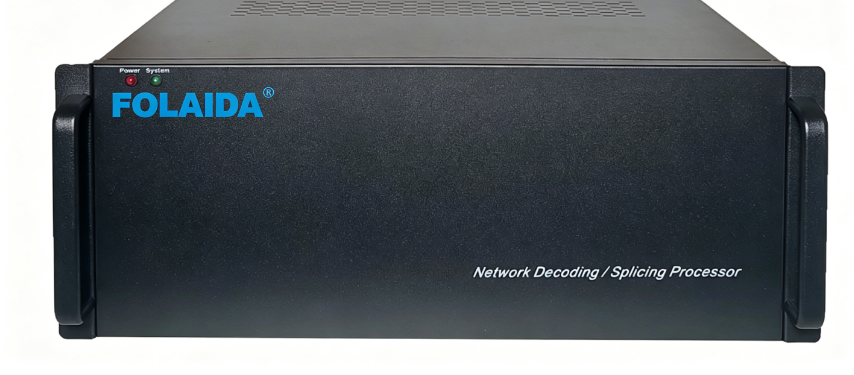
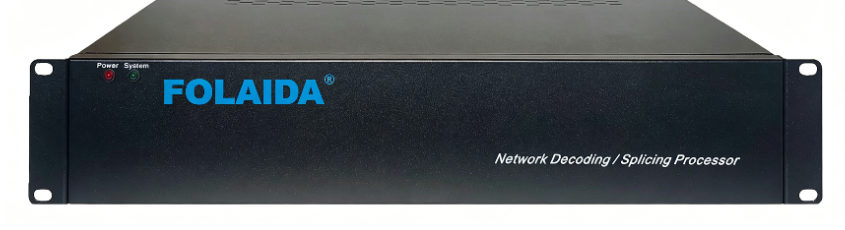
The video wall controller is generally a 19” rack compatible computer chassis with operating system handling different input and output signals. The video wall processor receives different input signals through HDMI, DVI, SDI, video or other cables or even through the LAN. The controller has several outputs, usually controlling multiple monitors or screens.  The video wall screen is a coherent screen of multiple displays usually 4×4, 6×2, 8×2 or up to 172×44 arrangements. Over these screens the information can be displayed in any position and size regardless of the monitor borders. The total resolution of the video wall is the sum of the individual monitors’ resolution.https://folaida.com/product-item/video-wall-processor/

Over this video wall, a large coherent Windows 10 or Windows Server 2019 desktop is displayed by the controller. This is a graphics desktop where any standard windows desktop applications or operating system services can be rendered. You can display and work with any web browsers and open any desired webpage. All webpages appear live and you can have multiple browser windows opened parallel.

Any of the windows and applications that might be used to complete your daily work can be moved around with a simple drag and drop operation over the video wall surface.

Additionally, to these standard Windows graphic applications, you can use SCADA and any Office applications like Excel and Power Point, or even mapping applications that can run in the graphics background.

Overlay windows

The users also have the possibility to display live overlay windows from HDMI, HDBaseT, legacy video and SDI inputs. These live inputs are displayed in real time and scaled to the desired position and size. These overlay inputs can overlap with the graphics windows and with each other of course.

All in all, we can display media players, satellite receivers, Blu-ray players or even PC outputs displaying operator workstations’ screens. Thus, the video wall has a combined function displaying Windows graphics and overlays from different inputs.

User interface

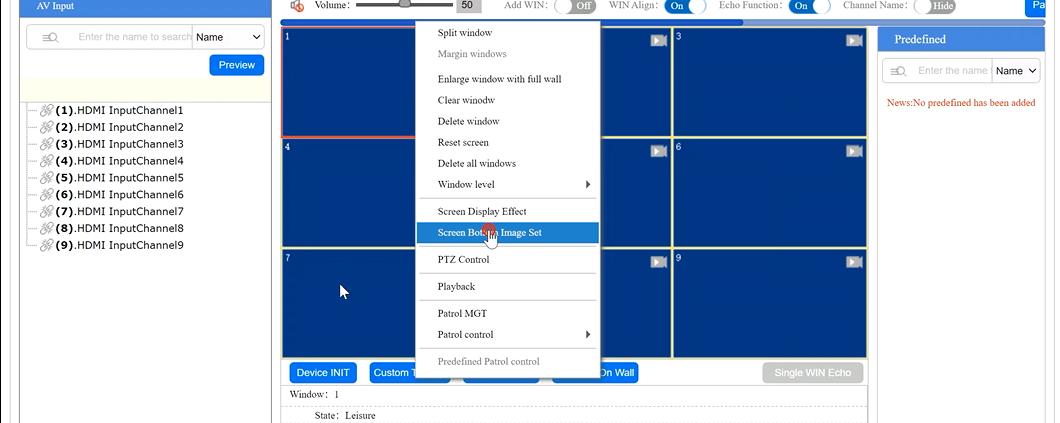
FOLAIDA video wall system can be controlled by an intelligent graphics user interface called FOLAIDA Control that can run locally or on any number of networked operator workstations who are sitting in front of the video wall. This operation needs installation of the program package to that certain operator PCs running Windows 10 operating system.

There is an extra Web browser based remote control service also, called FOLAIDA Control. This solution uses arbitrary Web browser technology that is HTML5 compliant. So, the user can control the FOLAIDA box from Windows, iOS, Android, Linux devices as for example mobile phones or tablets also.

The Preview option of the FOLAIDA video wall controllers makes possible to see the live preview of the input sources which allows the user to see what is being displayed over the video wall even from a remote location.

Layout Management

The layout management programs contain services to design and recall complex wall layouts. We can assign pre-designed layouts to each of the layout buttons. Users can set up and manage graphics application and browser windows with pre-defined content or attributes also.

The user-friendly user interface supports operators to work in native language as English, French, German, Japanese, Korean and Russian.

Summary

Video walls and video wall controllers can be used for traffic control, police command center, industrial process supervision, in mission critical control rooms whereas can be used as a LED wall controller or video wall display controller. A FOLAIDA video wall solution is a coherent screen of multiple monitors, over these screens we can display graphics information that are compatible with Windows 10 operating system. Additionally, we can display inputs from HDMI, HDBaseT or even LAN based inputs. We can also combine the inputs and the graphics windows to have a real time and great experience for the customers.https://studio.youtube.com/video/2aDKrQsPr20/edit

Related Links


  • Video Wall Processor– Explore advanced video wall processor options designed for seamless HD display control and management.
  • LCD Video Wall Solution– Discover comprehensive LCD video wall solutions that complement high-resolution processor technology.
  • HDBaseT Matrix Switcher– Learn about HDBaseT matrix switchers that enhance signal distribution for large venue displays.
  • Certificates– Verify compliance and safety standards with certified video wall processor products.
  • FAQ– Find answers to common questions about video wall processors and related digital signage technology.

What Should I Consider?

Video Wall System Considerations

How much do video walls cost? Can my space accommodate multiple displays? Is a processor necessary? We’ve outlined key questions to help you identify your needs and narrow your options when considering a video wall solution.

Match Your Needs to the Right Solution

Display Considerations

Choosing the right video wall display depends on several factors including your organization’s budget and use case. If you’re not sure where to start, we can help.

What’s the cost of a video wall?

While exploring the different video wall display options be sure to consider both the upfront cost of the displays as well as the total cost of ownership. Some technologies are more affordable initially, but the long-term costs of regular maintenance, consumable parts, and high-power consumption make them extremely expensive over time. Other display types are more expensive at purchase, but far less costly in the long term due to their efficient performance and minimal maintenance needs.

How much space do I need for a video wall?

Flat panel displays, like LCD and LED, have narrow profiles and can be wall-mounted. This makes their overall footprint virtually nonexistent. Other technologies, like projection cubes and blended projection systems, demand several feet of floor-space. Before committing to a particular display type make sure you determine how much space is available.

Will room lighting affect the brightness of a display?

A display’s brightness is determined by the way it produces light. Some technologies are vulnerable to being washed out by ambient light. If your space has large windows or overhead lighting your display should offer a high maximum brightness. A display system that isn’t bright enough will make your content hard to see and can cause eye strain.

Is video wall resolution important?

Different types of display panels provide different levels of pixel density or quantity of pixels per inch. Pixel density is important. It affects the total resolution of your video wall as well as the sharpness and detail of images when viewed up close. If you need to display highly detailed content on your video wall, or if people will be viewing the wall up close, select a display type with high pixel density.

How does system usage factor into selecting the right display type?

If your system will support mission-critical operations and needs to be in use 24/7, you’ll need a display type that offers high reliability and longevity. Some displays, like LCD and LED, support 24/7 use for years on end. They may also offer redundant power supplies and other fail-safe capabilities. Be sure to avoid display types with consumable parts such as lamp-based projection systems. These systems will require regular downtime for part replacement.

Software Considerations

Software is a critical element needed to manage and control any video wall system. We’ve outlined what you need to know upfront to make the right selection.

Processor Considerations

A video processor works in tandem with video wall management software to route selected content to the desired area of the display canvas. Knowing your overall content sharing goals will help you determine the right processor for your needs.

Are you seeking real-time content control?

If your display wall is meant for mission-critical applications that requires real-time content control, you’ll need a processor that supports this type of dynamic interactivity. However, if your system will play automatic, pre-programmed content, you’ll want to choose a processor that supports digital signage playback, distribution, and content management.


How much content do you plan to display at one time?

The number of inputs a processor can accept varies, and determines the number of different content sources the processor can display at once. If you need to display a large number of content sources simultaneously, be sure to select a processor with a large amount of inputs and outputs. You should also consider a processor that accepts streamed content sources as well. The ability to display content from non-physical sources gives your team more flexibility.


Is 24/7 system usage critical to your operations?

Just like with displays, some processors are particularly well-suited for constant use. If your application demands extreme reliability and resilience, look for a processor that is designed for 24/7 performance. These processors are built for maximum reliability. They typically feature added fail-safes like redundant power supplies that allow the system to continue operating even if an individual component fails.


Do you require multiple video wall systems or auxiliary displays?

If you want to display content on more than one video wall or display surface then you need to choose a processor that can manage multiple systems at a time and accommodate different technologies.


Will you need advanced graphics processing?

Some applications use ultra-high-resolution content such as education, simulation, and digital signage. If your application requires this sort of capability then look for a processor or rendering engine that offers 3D-accelerated graphics hardware and places a strong emphasis on graphical performance.

Environmental Considerations

Environmental factors like weather exposure, location, terrain, and more have a major impact on which video wall system will work best for your organization. Begin by assessing your surroundings.

Will environmental stressors affect a system?

As you plan your project you should identify any “environmental stressors” that might affect your video wall or it’s performance. Extreme temperatures, humidity, and vibration can quickly damage a display system that is not designed to withstand these pressures. If you’re planning to use your wall in a rugged environment, be sure to select robust and easily portable components. Some display types and processors are specifically designed for use in harsh environments.


What are your integration needs?

Some video wall solutions can integrate with external technology such as conferencing systems, speakers, and lighting. Once connected to your video wall, these devices can be controlled through your system’s software. If these device control options interest you, be sure to select a solutions provider with proven success performing complex integrations.


What are the aesthetic goals of your space?

Systems built in public spaces or corporate locations, like universities or lobbies, should be attractive and on-brand. Make sure you take the final look of your solution into consideration for these environments. For the best results choose a solutions provider that offers a range of customization options.

Support Considerations

Making sure that you have a team on hand for assistance when you need it can help you get the most out of your solution and help ensure your system is always up and running for visualization of critical information.

Will technical support be in place for your new video wall?

A video wall is a major investment, so make sure you protect and support it for years to come. Choose a provider with a strong, long-term technical support program. Your plan should include easy access to knowledgeable personnel who provide training, can answer questions, and troubleshoot issues. If you use the video wall 24/7, then you need access to 24/7 support. Your plan should also provide on-site support options in the event that an issue can’t be resolved remotely.


Can your video wall provider gain access to your site?

If you plan to deploy your system in a highly secure or downrange location, access to your site might prove tricky for your provider. In this cases, your own personnel or pre-cleared contractors will install and maintain the system. Look for a provider that offers in-depth, hands-on training. This will prepare your personnel to support the system in the field.

indoor led display

What’s The Best Display Type?

Compare Display Options

What are the Features and Benefits of LCD Technology?

LCD (liquid crystal display) technology is included in most smartphones, computer monitors, televisions, and other visual devices. Understand how a LCD display panel can serve as the focal point of your setup for optimal visualization.

What is a LCD?

LCD panels are composed of two polarized pieces of glass surrounding a layer of liquid crystals. Liquid crystals themselves aren’t light-emitting, so standard LCDs feature their own backlighting array that shines through the arrangement of liquid crystals to create the display’s picture.

Features and benefits
  • High resolution – bright display of text, images and video
  • Reliable – can withstand vibrations, humidity, and UV light
  • Serviceability – easy to service
Considerations
  • Affordable – requires minimal maintenance
  • Bezel edges – forms visible “seams” when monitors are arranged in a tile format
  • Portable – easy to move from location to location (compared to LED panels)
Use Cases
  • Command centers
  • Control rooms
  • Security operation centers
  • Network operation centers
  • Real-time crime centers
  • Emergency operations centers
  • Education and research facilities
  • Conference rooms and other presentation spaces


What are the Features and Benefits of LED Technology?

LED (Light Emitting Diode) or Direct View LED (DvLED) panels are similar to LCDs. However, there are some distinct differences and considerations. Understand these differences to help you consider which display type will work best for your environment.

What is a LED?

LEDs use an array of light-emitting diodes as individual pixels across the entire display. Hundreds and hundreds of light-emitting diodes across the display are grouped in clusters of red, green, and blue which provide their own light while producing the required image.

Features and benefits
  • Bright display – includes extreme brightness and color accuracy
  • Seamless view – creates a seamless visual canvas when display panels are grouped together
  • Reliable – long lifespan and functions well in varying temps
Considerations
  • Cost – higher upfront price point (compared to other displays)
  • High ambient lighting – Ideal for rooms that require more than 500 NITs
  • Aesthetics- optimal for environments that warrant an impressive video wall
  • LED controller – dictates the capabilities of the display in good or restrictive ways
Use Cases
  • Very large video wall setup (more than 40 panels)
  • Control room applications such as SCADA and DoD layouts where bezels can negatively impact content
china international import expo

What Is a Video Wall?

Video Wall System Basics

Components of a Complete System

What makes a video wall operate?

A comprehensive video wall solution requires specific software to make all of the components work together.

Why is special software needed?

Video wall software provides a user interface to control or manage your displays, video processors, connected system devices, and source content. Most video wall management software creates a “dashboard” of the system that includes a real-time view of the displays and a list of your available content sources.

What are the features and benefits of video wall management software?

At its most basic level, the interface allows you to select content sources and place them on your display in real-time. Most programs also include tools for adjusting the appearance of content such as scaling, zooming, and cropping options, brightness and contrast controls, and so on.

Does the software provide flexible capabilities?

Some software offers special presentation-building functionality. This may include the option to build and save a sequence of pre-arranged content layouts, which can then be presented manually or automatically on the displays. Select platforms also offer custom labels, graphical transitions, and other tools for enhancing presentations.

Is the software easy to use?

Software should provide a simple, intuitive interface that is designed for all users from non-technical to “power users”. In today’s fast-paced operations environments, you want to eliminate the need for custom programming or extensive training to use the software and manage your video wall.

Is the software secure?

With the surge of advanced threats, you want to be confident that your video wall software platform is secure. The software should provide granular permission settings so you can control the content and access for each user or user group. In addition, the software should include the most up-to-date industry standards like TLS 1.2 encryption and Single Sign-On (SSO) capabilities.

What Does a Processor Do?

Video wall processors, also known as controllers, connect your content sources to the display wall. They let you control what content is shown on the wall, when and where it appears, and how it will ultimately be displayed.

Why do I need a processor?

Using IP streaming or physical inputs, the processor funnels content from all of your desired sources, such as video cameras, computer workstations, and cable boxes.

How does a processor connect content to the video wall?

The processor makes the content visible and accessible on a single interface. It also allows all of the individual displays in your video wall to work together as a single canvas. This means that content can be placed on a single display, stretched across multiple displays, or dragged across the display surface.

How do I use the processor?

Based on the commands you set up through the control software, the controller sends content to the displays and lets you arrange, scale, and adjust the content in real-time. Some controllers also let you build and save content arrangements offline before displaying them as custom layouts.

Diplays

Display panels used in video walls provide a large scale, high-resolution “visual canvas” for your mission-critical content.

What is a display panel?

Video walls are usually made from a tiled arrangement of panels or projection screens. Tiling multiple displays together can create an extremely large, multi-HD display surface.

How do they work?

A large range of display technologies are used to create these walls, such as LCD, LED, blended projections, and projection cubes. Each display type has specific features, benefits, and things to consider like resolution, brightness, reliability, cost, and other factors.

What are the size and configuration options?

Depending on the display type and its mounting system, these walls can be built in flat, curved, or even three-dimensional shapes. They can be small enough to be portable or large enough to fill a multi-story atrium.

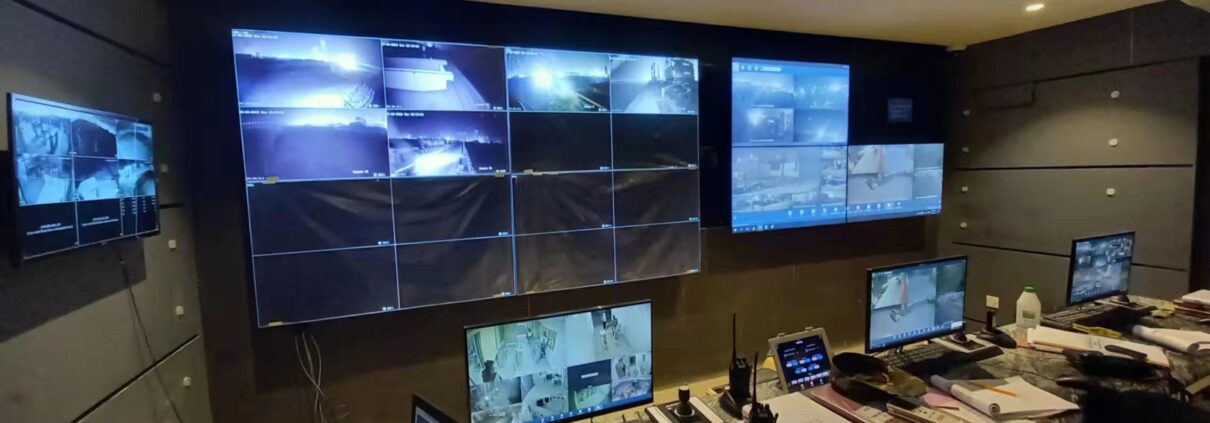
The optimum control for control rooms: Video Walls

The optimum control for control rooms: Video Walls

The command and Control room market is going through a fast advancement. The government organizations are investing more on disaster management, public security and infrastructure development which is driving control rooms market. Nowadays, there is a desire to be better connected and synchronized through a single large display wall, be it for utilities, disaster management, security & surveillance or traffic management. Central command and control centers are responsible for monitoring all activities and be prepared, at a strategic level, for an emergency or disaster. The common function of Control rooms is to gather and analyse data, monitor them and make decisions accordingly.https://folaida.com/product-item/lcd-video-wall/

The power of Integration- What are Control Rooms made of?

Traditional control rooms were equipped with desktop monitors, mimic panel and TVs, which have become obsolete in control rooms because to their limitation of displaying partial information due to low resolution of monitors and short life span.

Modern control rooms contain a series of Video screens providing high level of live statistical and analytical information that can be drilled down into detail. Video walls are comprised of individual cubes stacked edge-to-edge to create one large logical canvas. The video wall can be increased in overall size by adding displays horizontally and/or vertically. Various information can be displayed like- different types of SCADA, GIS, IP Cameras, Signalling, power traction and more on a Video wall. To complete the system, a video wall controller is connected to the video wall that helps in content placement on the screen, re-sizing of the content and many more functions. Used as a monitoring tool, the video wall enhances the operator’s effectiveness in responding to problems quickly as they arise.

Technology for achieving exceptional Visual Quality

Control rooms serve as the nerve center of any major operation. They display high-quality video and information feeds which operators can monitor, detect and act on real-time information; Integrate and control data from multiple sources – show timely and accurate information; View content at any size and location on Video wall.

Mimic panels, TVs, and desktop monitors are outdated technology and have limited application in today’s mission-critical industries. Video wall makes information display seamless, leading to better decision-making.

There are a variety of video wall technologies available in market today, but not every technology is suitable for mission-critical operations. Digital Light Processing (DLP) technology is most suitable for control rooms and command centers. DLP Video wall is accepted worldwide as it is specifically designed for 24×7 Control Rooms. With seamless bezel of about 0.2mm, DLP Video wall has a longer life as compared to other technologies used for 24×7 operations.

Currently there are two light source available in DLP Video wall: LED and Laser. The latest in DLP Video wall is the Laser based DLP Video wall which is brighter, energy efficient and feature rich compared to its predecessor. Laser DLP Video wall having a lifetime of >100,000hrs and brightness as high as 2500 Lumens is becoming a preferred choice in all mission-critical control centers. Video wall controllers help operators to capture, display and manage varied sources on the Video wall.

Optimized for User

Large video wall provides an overview of the complete grid or processes for various utilities like water, dam, power and other process-control operations. Extremely reliable video walls and displays with impeccable image quality are very important for 24×7 operations.

Video wall helps to connect an unlimited number of sources to an unlimited number of displays. And is capable of integrating with all applications and software required to work in perfect synchronization.

From Lamp-based DLP Video walls to Laser-based DLP Video walls, the control room have evolved a lot in a decade. With these technological developments, we will surely see improved productivity, collaborative decision making and enhanced operators experience in control rooms.https://studio.youtube.com/video/2aDKrQsPr20/edit