

Video wall processor solutions for control rooms training rooms and commercial displays
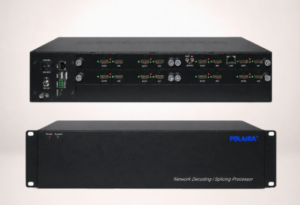
Commercial display project researchers often meet the term while comparing control room displays, training room systems, enterprise presentation spaces, and public-facing video walls. The useful question is not whether the word “solution” describes a complete project package. It is whether the room needs multi-source input, window management, screen grouping, scene recall, preview, drag-and-drop operation, or picture-in-picture viewing to make a display wall practical.
Where a Video Wall Processor Solution Fits in Display Tasks
In a control room, a video wall processor solution becomes relevant when operators need to observe several sources at the same time instead of switching one full-screen image after another. The task may involve dashboards, camera feeds, maps, alarm views, status screens, or workstation outputs on a shared display wall. In that setting, windowing and roaming are not decorative functions. They allow one source to stay large while secondary sources remain visible, so the video wall becomes a working surface rather than a passive screen. General video wall processing knowledge supports this role because processors are commonly associated with scaling, windowing, signal distribution, and multi-display image handling. That industry role explains the application category without turning a product page into a record of a specific control room deployment. Training rooms create a different display problem. The priority is often switching between presentation content, simulation content, live input, and instructor-controlled reference material without breaking the session rhythm. A processor can support this by making layouts repeatable. One scene may emphasize the instructor feed, another may enlarge a software interface, and another may combine several views for discussion. FOLAIDA’s HDMI Video Wall Processor page uses terms such as display walls, monitor arrays, video wall systems, screen groups, up to 32 scene modes, preview, drag-and-drop operation, picture-in-picture, windowing, roaming, overlay, and scaling. These terms are useful for understanding task fit in education and training spaces, while the exact room layout, source count, and card configuration remain project-specific. For this reason, saved layouts, clear source priority, and predictable recall behavior matter more than a broad claim of flexibility. Commercial display projects add a third pattern. Retail, exhibition, lobby, entertainment, and corporate display environments often care about visual composition: a large background image, a product video, a live feed, and several graphic zones may need to appear across one wall. Here, the processor’s value is not only the number of inputs or outputs. It is the ability to shape content across screens, create different screen groups, and recall layouts for different display moments. This is why a video wall processor for commercial display projects is often researched together with matrix switching, video wall splicing, window management, and scene modes. The same vocabulary may appear on a product page, but in scenario research those terms work best as application clues rather than statements about manufacturing scale, supply terms, or completed project delivery.
How Multi-Source Viewing, Window Management, and Scene Modes Map to Daily Use
A practical way to judge a video wall processor solution is to start from the display behavior users expect during operation. Interface names such as HDMI, VGA, YPbPr, IP streaming input, RS232, LAN software, or WebGUI matter when they explain how sources enter the system or how layouts are controlled. For scenario research, the deeper question is which display task would become difficult without processor-level control.
•Multi-source viewing is useful when the display wall must show several live or prepared feeds at once. A control room may need cameras and dashboards together, while a training space may need presentation slides beside a software interface. The processor’s role is to make those sources visible in useful proportions, not merely to connect cables.
•Window management matters when content size and position change during use. Resizing, moving, roaming, overlay, and scaling help a team adapt the display wall to the current discussion, monitoring priority, or presentation moment. This differs from a simple splitter that only repeats or divides a fixed signal.
•Screen groups help when one processor is expected to manage different display areas or wall sections. A commercial venue may want one group for brand content and another for live information, while a training room may separate instructor material from participant-facing visuals. The value is layout organization, not a blanket statement about any screen count.
•Scene modes are useful when teams need repeatable layouts. If a room regularly shifts between monitoring, briefing, training, demonstration, and review, saved scenes reduce manual adjustment. FOLAIDA’s page-level function terms, including screen groups and up to 32 scenes, are relevant here, while the usable configuration depends on hardware selection and project design.
IP streaming and WebGUI wording should also be read through tasks. RTSP provides a common technical background for real-time streaming control in IP video environments, but a product’s protocol list, camera compatibility, network topology, and decoding behavior should be checked against its technical documents. Likewise, a WebGUI normally implies interaction through a web-based interface served over a network connection, but it does not define remote access policy, cybersecurity design, or usability in every project environment. For project research, these terms are useful starting points for understanding control and input options, not final acceptance criteria.
Application Terms That Should Stay Conservative in Project Research
Application words such as government projects, enterprise projects, commercial display, entertainment, education and training, simulation training, modeling, high-resolution video monitoring, and graphics-intensive applications can help researchers understand where a video wall processor may be considered. They should not be rewritten as case studies without a separate case record or project document. This distinction matters in B2B content because readers may use application wording to shortlist products, discuss requirements internally, or prepare technical questions for a supplier. A careful description can say that these terms indicate relevant display environments. It should not say that the processor has been accepted in a specific government, medical, transportation, fire safety, or emergency command project unless that project record is available. The same caution applies to fixed-size search phrases such as 16×16 HDMI Video Wall Processor. A keyword like that may describe how a researcher imagines an input-output scale, but it is not the same as a documented product layout, card combination, or final screen arrangement. FOLAIDA’s processor information includes modular chassis, input and output card concepts, screen groups, windowing, scene modes, and several control approaches. The 16×16 phrase should remain search vocabulary unless the exact configuration is shown in the specification or project design. This matters because video wall systems are shaped by source count, display count, resolution, interface type, content behavior, operator workflow, and installation design. Treating a keyword as a layout can create mismatched expectations before technical discussion begins. The strongest use of scenario wording is task mapping. If the project needs many sources visible at once, window management becomes relevant. If the same room has recurring operating modes, scenes become relevant. If different parts of a display wall must behave independently, screen groups become relevant. If users need to arrange content actively during meetings, training, or monitoring sessions, preview and drag-and-drop functions become relevant. When those needs are absent, a full processor may be more than the display task requires. This approach keeps the article useful for commercial display research while keeping application terms separate from project evidence, industry compliance, and fixed hardware layouts.
Conclusion
A video wall processor solution should be evaluated by the display tasks it helps manage: multi-source viewing, window movement, screen grouping, scene recall, preview, drag-and-drop control, and picture-in-picture presentation. Control rooms, training rooms, and commercial display spaces may use these capabilities differently, so the best first step is to describe the intended screen behavior before assuming a fixed layout or industry deployment. FOLAIDA’s HDMI Video Wall Processor page provides relevant function and application vocabulary for this research, while detailed configuration, project layout, compatibility, and acceptance requirements should be checked separately. For a buyer or researcher, that distinction keeps the discussion practical and prevents a search term from being mistaken for an engineering result.
FAQ
Q:What does video wall processor solution mean in a commercial display project?
A:It usually means a processor-based approach for handling multiple sources, arranging content across several displays, managing windows, and recalling display layouts. In a commercial display project, the word “solution” should be read as an application fit around display tasks, not as automatic proof of a complete engineering package, finished installation, or final project configuration.
Q:Which display tasks make window management and scene modes useful?
A:Window management is useful when operators, instructors, or presenters need to resize, move, overlay, or compare several sources on the same display wall. Scene modes become useful when the room repeats several layouts, such as monitoring, briefing, teaching, demonstration, or public display playback, and users need to recall those layouts without rebuilding them manually.
Q:Does a 16×16 HDMI Video Wall Processor keyword prove a confirmed product layout?
A:No. A phrase such as 16×16 HDMI Video Wall Processor can reflect how a buyer searches for a fixed input-output scale, but it does not establish that a specific product page, chassis, card combination, or project design uses that exact layout. The actual configuration should be checked against documented specifications and project requirements.
Sources / References
Video Wall Processing
RFC 2326: Real Time Streaming Protocol
What is a web server?
Related Examples
FOLAIDA 4K Modular HDMI Video Wall Processor
