
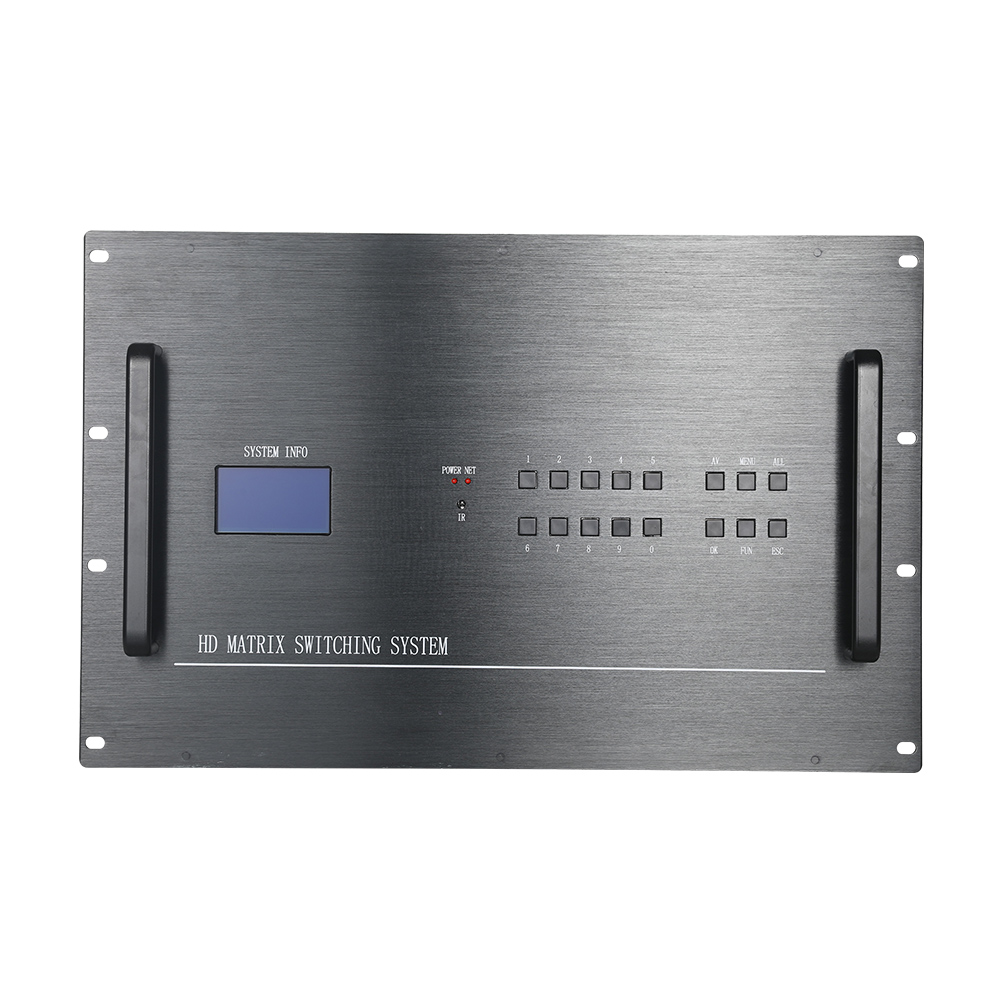
HDMI Matrix vs HDMI Splitter: Complete Comparison Guide Introduction: HDMI Matrix vs HDMI Splitter
When designing a professional audio and video system, one common question is:
Should I use an HDMI Matrix Switch or an HDMI Splitter?
Although both devices distribute HDMI signals to multiple displays, they serve completely different purposes.
An HDMI Splitter duplicates one HDMI source signal to multiple displays, while an HDMI Matrix Switch allows multiple HDMI sources to be independently routed to multiple displays.
Choosing the right solution depends on your application, system size, control requirements, and future expansion needs.
In this guide, we will explain the differences between HDMI Matrix and HDMI Splitter, their advantages, applications, and how to choose the right solution for professional AV systems.https://folaida.com/product-item/hd-matrix-switcher/
What Is an HDMI Matrix?
An HDMI Matrix Switch is a professional AV signal routing device that connects multiple HDMI sources with multiple HDMI displays and provides flexible signal switching and distribution.
An HDMI Matrix allows users to select:
- Which source is displayed on each screen
- Different content on different displays
- Multiple sources distributed simultaneously
For example:
A 4×4 HDMI Matrix Switch supports:
- 4 HDMI input sources
- 4 HDMI output displays
Any input can be routed to any output.
Example:
Input Sources:

PC 1
PC 2
Camera
Media Player


        ↓


HDMI Matrix Switch


        ↓


Displays:

Screen 1 → PC 1

Screen 2 → Camera

Screen 3 → Media Player

Screen 4 → PC 2
This flexibility makes HDMI Matrix systems ideal for professional AV environments.
What Is an HDMI Splitter?
An HDMI Splitter is a device that takes one HDMI input signal and duplicates it to multiple HDMI outputs.
For example:
A 1×4 HDMI Splitter:
- 1 HDMI input
- 4 HDMI outputs
Signal flow:
One HDMI Source

        ↓

HDMI Splitter

        ↓

Display 1
Display 2
Display 3
Display 4
All displays receive the same content.
Example:
A company wants the same presentation displayed on four TVs in different rooms.
An HDMI Splitter can easily achieve this.
HDMI Matrix vs HDMI Splitter: Key Differences
| Feature | HDMI Matrix Switch | HDMI Splitter |
|---|---|---|
| HDMI Inputs | Multiple | Usually One |
| HDMI Outputs | Multiple | Multiple |
| Signal Routing | Independent | Fixed Distribution |
| Different Content on Screens | Yes | No |
| Multiple Sources | Yes | No |
| Professional AV Applications | Yes | Limited |
| Video Wall Support | Yes | No |
| Control System Integration | Yes | Limited |
| Scalability | High | Low |
Main Difference: Flexible Switching vs Signal Duplication
The biggest difference between HDMI Matrix and HDMI Splitter is how they handle HDMI signals.
HDMI Splitter
A splitter answers this question:
“How can I show the same content on multiple screens?”
Example:
One computer → Five displays
Applications:
- Digital signage
- Retail advertising
- Information screens
HDMI Matrix
A matrix answers this question:
“How can I control multiple sources and multiple displays independently?”
Example:
Five computers → Ten displays
Each display can show different content.
Applications:
- Conference rooms
- Control centers
- Training rooms
- Broadcast studios
HDMI Matrix Advantages
1. Independent Source Selection
With an HDMI Matrix Switch, every display can select its own HDMI source.
Example:
Conference Room A:
Display 1 → Laptop
Display 2 → Camera
Conference Room B:
Display 3 → Media Player
Display 4 → PC
2. Professional Control Options
Commercial HDMI Matrix systems support:
- Front panel control
- Remote control
- RS232 control
- TCP/IP network control
- Web interface
- Third-party control systems
This makes HDMI Matrix suitable for integrated AV projects.
3. Supports Large AV Systems
HDMI Matrix solutions can be expanded from:
- 4×4 HDMI Matrix
- 8×8 HDMI Matrix
- 16×16 HDMI Matrix
- 32×32 HDMI Matrix
Large installations can manage dozens of HDMI sources and displays.
4. Better for Future Expansion
Professional AV projects often grow over time.
An HDMI Matrix provides:
- More input options
- More output options
- Flexible system upgrades
HDMI Splitter Advantages
Although HDMI Splitters are less flexible, they are useful for simple applications.
1. Simple Installation
HDMI Splitters are easy to install:
One source → Multiple displays
2. Cost Effective
For basic applications, HDMI Splitters provide a lower-cost solution.
3. Ideal for Duplicate Display Systems
Common applications:
- Retail stores
- Exhibitions
- Digital signage
- Home entertainment
HDMI Matrix vs HDMI Splitter: Application Comparison
Conference Room
Recommended Solution:
✅ HDMI Matrix Switch
Why?
Modern conference rooms require:
- Multiple laptops
- Wireless presentation
- Multiple displays
- Flexible switching
Example:
Laptop 1 → Display 1
Laptop 2 → Display 2
Camera → Display 3
Control Room
Recommended Solution:
✅ Professional HDMI Matrix System
Control rooms require:
- 24/7 operation
- Multiple video sources
- Multiple monitoring screens
- Fast source switching
Digital Signage
Recommended Solution:
Depends on requirements.
Same content everywhere:
✅ HDMI Splitter
Different content:
✅ HDMI Matrix
Video Wall System
Recommended Solution:
✅ HDMI Matrix + Video Wall Processor
Professional video walls usually require flexible source management.
HDMI Matrix vs HDMI Splitter for 4K and 8K Systems
Modern AV systems require higher resolution support.
HDMI Matrix Features:
Professional HDMI Matrix Switches support:
- 4K@60Hz
- 8K HDMI 2.1
- HDR
- HDCP 2.2 / HDCP 2.3
- EDID management
HDMI Splitter Features:
HDMI Splitters may support:
- 4K resolution
- Basic HDCP compatibility
However, advanced control features are usually limited.
How to Choose Between HDMI Matrix and HDMI Splitter?
Choose an HDMI Splitter if:
✔ You only need one HDMI source
✔ All displays show identical content
✔ Simple installation is required
Examples:
- Store advertisements
- Lobby displays
- Home entertainment
Choose an HDMI Matrix if:
✔ You have multiple HDMI sources
✔ Displays need different content
✔ Professional control is required
✔ System expansion is expected
Examples:
- Conference centers
- Command centers
- Education facilities
- Corporate AV systems
Why Professional AV Integrators Prefer HDMI Matrix Solutions
Professional AV projects require more than simple signal duplication.
An HDMI Matrix provides:
- Flexible signal routing
- Centralized control
- Reliable operation
- Multi-display management
- Easy system expansion
For commercial installations, HDMI Matrix Switches provide a scalable solution for modern AV distribution.
FOLAIDA Professional HDMI Matrix Solutions
FOLAIDA provides professional HDMI Matrix Switch solutions for global AV applications.
Our HDMI Matrix products support:
- 4K and 8K HDMI distribution
- Multiple input/output configurations
- EDID management
- Seamless switching
- RS232 and IP control
- Video wall integration
FOLAIDA HDMI Matrix solutions are designed for:
- AV integrators
- System installers
- Distributors
- Enterprise customers
Frequently Asked Questions
Is HDMI Matrix better than HDMI Splitter?
For professional AV systems, HDMI Matrix is usually better because it provides independent source switching and display control.
Can HDMI Splitter replace HDMI Matrix?
No. HDMI Splitter only duplicates signals and cannot independently control multiple sources.
Which is better for conference rooms?
HDMI Matrix is recommended because conference rooms often require multiple sources and displays.
Does HDMI Matrix support video walls?
Yes. HDMI Matrix systems are commonly used with video wall processors for professional display applications.
Conclusion
The difference between HDMI Matrix and HDMI Splitter comes down to flexibility.
An HDMI Splitter is designed for simple signal duplication:
One source → Multiple displays
An HDMI Matrix Switch is designed for professional AV management:
Multiple sources → Multiple displays with independent control
For small simple systems, an HDMI Splitter may be enough.
For conference rooms, control rooms, video walls, and commercial AV projects, an HDMI Matrix provides the flexibility, reliability, and scalability required for professional installations.https://studio.youtube.com/video/2aDKrQsPr20/edit
