
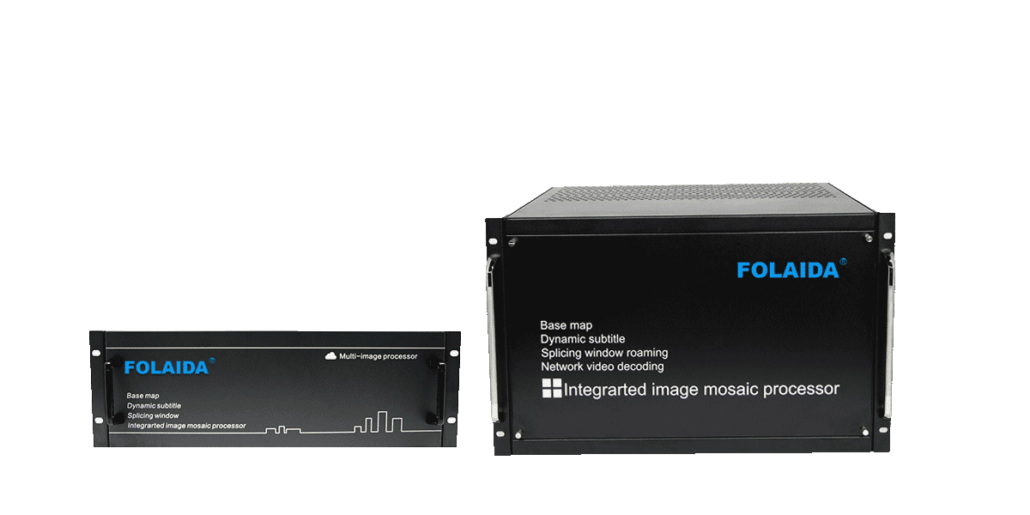
Pure Hardware and PC-Based Video Wall Processors Differ in Control Rooms
Introduction: Both architectures can push many inputs onto a video wall, but operating system dependency, startup logic, and failure behavior separate them in daily operation.
A video wall in a control room is judged by one thing: whether the picture is there when someone needs it. Buyers comparing a pure hardware processor against a PC-based controller usually start with input counts and output resolution, then discover that the more important difference is what sits between the power switch and the image on the wall. One architecture runs an operating system. The other runs dedicated video processing silicon. That single choice shapes startup time, exposure to malware, the way a fault appears on screen, and how quickly a technician can bring the wall back.
Why Operating System Dependency Changes Video Wall Reliability
In a PC-based video wall controller, the wall is essentially a computer with capture and output cards. Powering up runs firmware POST, then a bootloader, then an operating system kernel, then drivers, then the wall management application. Every one of those steps can hold up the picture. The OS also brings a file system, user accounts, background services, scheduled updates, and antivirus scanning. In a 24/7 control room, the update cycle is the part operators notice most, because a patch that lands on a Tuesday afternoon can demand a restart that a dispatch floor cannot easily schedule. A pure hardware processor removes the OS layer entirely. Video signals travel from an input card through a dedicated processing chipset array to output cards, driven by firmware rather than a general-purpose computer. FOLAIDA’s video wall processor is built this way, using a pure hardware video processing chipset array with no operating system. There is no desktop to log into, no service list to manage, and no monthly patch calendar attached to the display path. Startup logic becomes a hardware initialization sequence instead of a software launch sequence. The security consequence is easier to explain than many buyers expect. Malware is software, and software needs somewhere to run. NIST SP 800-53 frames security control work around limiting and managing the components that can be attacked, which is exactly the logic here. Removing a general-purpose operating system reduces some PC-specific attack paths, but it does not establish that the device has no file system, accounts or exploitable software. A hardware processor still has firmware and a control path — a LAN client, a WebGUI page, or an RS232 port — which need appropriate access control, network protection and maintenance.
How Startup Behavior and Failure Modes Differ Between the Two Architectures
Startup and failure are where the two architectures separate most visibly, and this is the area ELV technicians recognize from chasing a no-signal fault late at night. The differences follow a few recognizable patterns.
Startup path and time to picture: A PC-based controller shows a full boot sequence — hardware check, kernel load, driver initialization, service start, then application launch. Time to picture is measured in tens of seconds to minutes and can shift after a failed update. A pure hardware processor initializes its chipset array and firmware, then establishes valid signal links. It avoids a general-purpose OS boot, but actual time to picture remains model- and signal-dependent.
What a single fault takes down: On a PC platform, the operating system is a shared dependency. A driver conflict, a corrupted system file, or a failed system disk can blank every screen at once even though the input and output cards are healthy. On a modular hardware platform, some card or channel faults can remain local, while shared firmware, backplane, control or power faults can affect the whole wall.
Maintenance and replacement granularity: The supplied FOLAIDA product reference lists hot-swappable modular cards. Confirm the supported card types and service procedure: an affected channel may be interrupted, and PCIe alone does not guarantee hot-swap support. On a PC-based controller, swapping a capture card often means shutting down the operating system and the entire wall with it.
Scheduled interruptions: OS platforms accumulate recurring downtime — security patches, antivirus definition updates, driver updates, disk checks. A firmware-driven processor still needs occasional attention, but it does not carry an operating system’s update calendar into the control room.
These patterns describe architecture categories, not brand quality. PC-based controllers run plenty of installations successfully, and a pure hardware processor can still be affected by power problems, heat, cabling, or a failed display panel. The practical difference is the set of dependencies to maintain. Both architectures can suffer component-level or whole-system faults; a firmware-driven processor removes the general-purpose OS dependency but not every shared failure mode.
What Pure Hardware Design Means in Real Control Room Uptime Expectations
In a control room, uptime expectations are set by the operational calendar rather than by the hardware. Dispatchers, traffic operators, and security teams measure the wall in shifts, so an outage of twenty minutes during a handover is a genuine event. Pure hardware design changes two of the biggest contributors to unplanned downtime — software crashes and update restarts — and it also changes how quickly a wall comes back after a real hardware fault. The day-to-day effect is that maintenance planning gets simpler. There is no general-purpose OS antivirus or patch cycle in the video path, but firmware and control software still need a maintenance plan, and updates can require a restart or introduce a regression. Some faults can be serviced at card level; shared components may require wider service. Chassis options such as 3.5U and 7U determine how many input and output cards can be installed, and supported hot-swappable cards may allow channel service without a full shutdown, following the specified procedure. Optional redundant dual power supplies can tolerate a supported supply-module failure when correctly configured; they do not remove upstream power or other shared faults. Input capability reaches 4K@30Hz, while standard I/O boards list 1920×1080@60Hz, and that gap is worth checking against the actual source list before assuming a resolution requirement is covered. What pure hardware design does not remove is electrical risk. A no-OS processor still connects to mains power, so insulation, earthing, overcurrent protection, and surge protection remain part of the installation. Electrical safety requirements still apply regardless of whether a controller boots from firmware or from a disk. For equipment placed on the EU market, check the applicable Low Voltage Directive requirements and the supplied model-specific safety and conformity documentation.
Conclusion
The two architectures are not separated by input counts or by marketing labels. They are separated by whether a general-purpose operating system sits in the signal path at all. That decision determines startup behavior, how many software layers can fail before the picture does, how much of the device is exposed to malware, and whether a fault takes out one card or the whole wall. For anyone evaluating a video wall processor for continuous operation, the useful question is not which category sounds more advanced, but which failure modes the site can tolerate. A modular, no-OS design such as the FOLAIDA video wall processor answers that question with card-level service and a firmware startup path, while the site still needs solid power protection and cooling around it.
FAQ
Q:What makes a pure hardware video wall processor different from a PC-based controller?
A:A pure hardware processor routes video through a dedicated chipset array driven by firmware, with no operating system between power-on and picture. FOLAIDA’s video wall processor follows that model. A PC-based controller is a computer first: it boots Windows or Linux, then a wall management application drives capture and output cards to build the image. That extra software layer is what creates the differences in startup time, update cycles, and the way faults appear on screen.
Q:Why does an operating system create more failure points in a video wall controller?
A:An operating system adds a full software stack that must work before the wall shows an image, including the bootloader, kernel, drivers, background services, and the management application. Each stage is a possible failure point, and shared resources such as the system disk or display driver can take down every screen at once. The OS also needs patches, antivirus updates, and restarts. Removing the general-purpose OS removes those OS-specific dependencies, while firmware, control, power, heat, cabling and panel problems remain.
Q:Does a no-OS video wall processor still need electrical safety and power protection?
A:Yes. Dropping the operating system does not change the fact that the chassis runs on 110–240V AC mains, so insulation, earthing, overcurrent protection, and surge protection still matter. Check the applicable electrical safety requirements and the supplied model-specific conformity documentation, including Low Voltage Directive requirements for equipment placed on the EU market. Optional redundant power supplies inside a modular chassis help with an internal supply failure, while site-level protection covers everything upstream of the rack.
Sources / References
SP 800-53 Rev. 5, Security and Privacy Controls for Information Systems and Organizations

